

How to operate the control panel of a silent diesel generator?
If you’ve ever stood next to a traditional diesel generator during a power outage, you know how jarring that loud, rumbling noise can be—enough to startle a sleeping baby, disrupt a work-from-home call, or even rattle windows in a quiet neighborhood. That’s why silent diesel generators have become such a game-changer for homeowners, small business owners, and industrial operators who need reliable power without the noise. As a supplier who’s worked with these systems for years, I’ve seen firsthand how many new users get stuck on the control panel: it looks like a jumble of buttons, screens, and switches, and a misstep here can lead to frustrating delays, or even damage to the unit you invested in.
Today, I’m breaking down exactly how to operate the control panel of a silent diesel generator, step by step, based on real-world experience from our customers and the hands-on training we provide. Whether you’re unboxing your first mini generator for home use or managing a large 180kva unit for a commercial space, these tips will help you feel confident every time you need to start, run, and shut down your generator safely. If you’re still shopping for the right model, check out our range of options, including the Canopy Diesel Generator, Mini Silent Generator For Home, The Most Quiet Generator, and compare specs to find what fits your needs. We also have clear pricing with our Small Silent Generator Price page, so you never have to guess about costs.
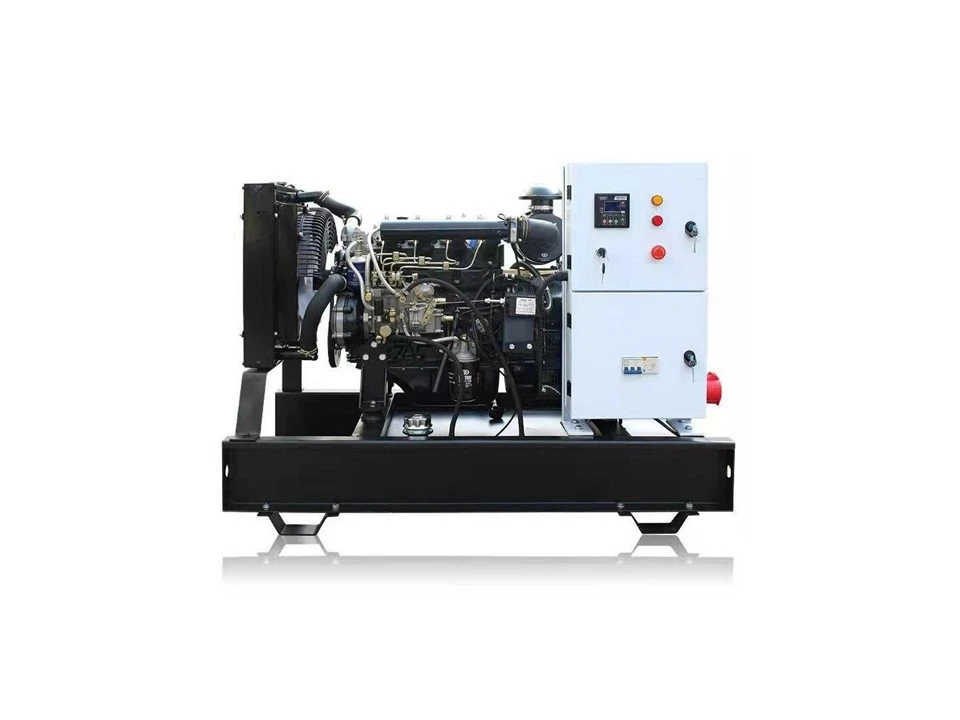

Before we dive into operating the control panel, let’s quickly note one key difference between silent diesel generators and their loud counterparts: most modern silent units have fully enclosed control panels, often mounted on the side of the generator’s acoustic canopy. That canopy is the reason they’re quiet—it traps the engine’s noise and redirects exhaust, while the control panel is protected from weather, dust, and accidental bumps. That protection is a big plus, but it also means some buttons might be recessed or covered by a small plastic flap, so you’ll want to make sure you have a clear line of sight and no debris blocking the panel before you start.
Now, let’s walk through the core functions you’ll use regularly, from pre-start checks all the way to shut down.
First: Pre-Start Checks (The Most Important Step No One Skips)
Before you ever touch a start button, the control panel relies on a few key systems to make sure the generator is ready to run. Silent generators are designed with safety in mind, so they’ll actually prevent you from starting if any of these checks fail. On most standard control panels, you’ll see a set of indicator lights and a digital display that shows real-time data like oil pressure, fuel level, battery charge, and coolant temperature.
Let’s break down the pre-start signals:
- Oil Pressure Light: This is non-negotiable. If the red oil pressure light is on when you turn the key, the generator can’t start—low oil pressure will destroy the engine in minutes. Before attempting to start, you’ll need to check the oil level via the dipstick (located on the side of the generator, not the control panel) and top it up if needed. The control panel will also show an error code if oil pressure is too low, so if that light stays on after checking, reach out to a technician or your supplier.
- Fuel Level Indicator: The digital screen on the control panel will show a percentage or a bar graph for fuel. Never run the generator below 10% fuel, especially for extended use—this can allow air to get into the fuel line and cause a hard start mid-operation. For most mini silent generators for home use, a full tank will run 8-12 hours, depending on the load, so you can plan accordingly.
- Battery Voltage: Silent generators use a small 12V battery to power the control panel and start the engine. The control panel will show the battery voltage on the display—aim for 12.4V or higher when the generator is off. If it’s below 12V, you’ll need to charge the battery with an external charger before starting, because a weak battery will struggle to turn the diesel engine over, especially in cold weather.
- Coolant Temperature: For larger units, like the Silent Power Generator 180kva, the control panel will also monitor coolant level and temperature. If the coolant is low or the engine is too cold, the panel will trigger a warning light to prevent overheating or damage.
Once all these indicators show green (or “OK” on the digital display), you’re ready to move to starting the generator.
How to Start the Control Panel (Step-by-Step)
Most modern silent diesel generators have three primary start modes, all controlled from the panel: Auto, Manual, and Stop. Let’s go through each, because using the right mode for your situation is key.
- Manual Start Mode (For When You Need Direct Control)
Manual mode is the most common for routine use, especially for smaller units like mini silent generators for home. Here’s how to do it:
- Locate the start switch on the control panel: It’s usually a large, round button marked “START” or a key switch (some older models use a key, while newer ones are push-button). For push-button models, press and hold the START button for 2-3 seconds—don’t hold it longer than that, because it can damage the starter motor. For key switch models, turn the key clockwise to the “START” position, then release it as soon as the engine turns over.
- Wait for the engine to stabilize: Once the engine fires up, the control panel will show the engine RPM (revolutions per minute) on the digital display. It should settle between 1500-1800 RPM for most 50Hz units, or 1800 RPM for 60Hz models. If it idles too fast or too slow, that’s a sign of a fuel or air flow issue, so you’ll want to shut down and check.
- Check the output light: After 10-15 seconds of stable idle, the control panel will turn on the “OUTPUT READY” or “VOLTAGE OK” light. That means the generator is producing power and ready to connect to your home or building. Never plug in devices before this light is on—power surges from unregulated voltage can damage electronics.
- Auto Start Mode (For Emergency Use)
Auto mode is designed for when you want the generator to kick on automatically during a power outage—no need to manually press buttons. Most silent generators with auto mode connect to your building’s transfer switch, which signals the generator to start when grid power drops. To set this up via the control panel:
- Locate the mode selector switch on the panel (it will have Auto, Off, and Manual positions).
- Flip the switch to “Auto.” The control panel will flash a green indicator to confirm it’s in auto mode.
- Note: When in auto mode, you still need to make sure the generator’s fuel tank is full, battery is charged, and no error codes are present. If the generator detects a power outage, it will start within 10-15 seconds, which is fast enough for most essential items like refrigerators, lights, and medical equipment. If you’re shopping for a generator with reliable auto mode, our range includes The Most Quiet Generator model, which has enhanced auto-start functionality for seamless power transitions.
- The Stop Switch (Critical for Safe Shutdown)
Shutting down a silent diesel generator incorrectly is one of the most common mistakes new users make. If you turn it off immediately after running it at full load, the engine can overheat, leading to costly damage. The control panel has two stop modes to prevent this:
- Normal Shutdown: This is for routine use after a power outage or when you’re done using the generator. First, turn off all the devices connected to the generator (unplug them or turn off their individual switches). Then, flip the control panel’s mode switch to “STOP” or press the red STOP button. The control panel will trigger a “cool down” cycle—this lets the engine idle for 2-5 minutes to lower its temperature before turning off completely. You’ll see the RPM on the display drop during this cycle, and then the generator will shut off automatically.
- Emergency Stop: If there’s a fire, smoke, or you notice a loud abnormal noise (even though it’s quiet, sudden changes are a red flag), use the emergency stop. This is usually a large, bright red button, often on the outside of the control panel or canopy, that you can press even if the panel is wet or dusty. Pressing it will cut power to the engine immediately, so only use this in urgent situations. After an emergency stop, you’ll need to have a technician check the engine before restarting, because a sudden shutdown can cause fuel lines to leak or damage internal parts.
Daily and Weekly Routine Checks via the Control Panel
Operating the control panel isn’t just for starting and stopping—you should do quick checks every time you use the generator, and weekly even if it’s sitting idle. The control panel will show all the data you need, so you don’t have to climb around the generator.
- Error Codes: Most modern panels have a digital display that will show error codes if something is wrong, like “LOW OIL PRESSURE” or “HIGH COOLANT TEMP.” These codes are a quick reference, but if you see a code you don’t recognize, check your user manual or contact our support team. For larger units like the Silent Power Generator 180kva, error codes can also indicate issues with the alternator, so it’s good to have them on hand.
- Load Monitoring: If you’re powering multiple devices, the control panel will show the total electrical load in kilowatts (kW) or kilovolt-amperes (kVA). Never exceed the generator’s rated load—overloading can damage the alternator. For example, a small silent generator for home use might be rated at 5kW, so don’t run a central air conditioner, oven, and water heater all at the same time. The control panel will often flash a warning light if you’re overloaded, so you can turn off non-essential devices right away.
- Fuel Level: Even if you don’t use the generator, check the fuel level via the control panel every month. Diesel fuel can go bad after 6-12 months, especially if there’s water in it, so you’ll want to top it up or add a fuel stabilizer if it’s going to sit for a long time.
Common Mistakes to Avoid When Using the Control Panel
After selling silent diesel generators for years, I’ve seen these mistakes cause more headaches than anything else, so I want to share them:
- Don’t force buttons or covers: The control panel is designed to be durable, but prying open a stuck cover or forcing a button that doesn’t click can break it. If something seems jammed, turn off the generator and check manually (making sure it’s not running!) before trying again.
- Don’t ignore warning lights: It’s tempting to press past a red oil light because you need power, but this will ruin your engine. The control panel’s safety features are there to protect your investment.
- Don’t use the generator without a transfer switch: Even if you start it manually, never connect it to your home’s grid circuit without a transfer switch. The control panel can’t protect against backfeeding, which can electrocute utility workers and damage your home’s wiring.
If you’re in the market for a silent diesel generator, whether for home backup, commercial use, or industrial needs, our range has options to fit every requirement. We offer the Canopy Diesel Generator for versatile outdoor use, Mini Silent Generator For Home for small spaces, The Most Quiet Generator for noise-sensitive areas, and clear pricing with our Small Silent Generator Price page. For larger power needs, our Silent Power Generator 180kva is built for heavy-duty use with a reliable control panel that’s easy to operate.
Operating a silent diesel generator’s control panel doesn’t have to be complicated. With these step-by-step tips, you’ll be able to start, run, and shut down your unit safely every time. If you have questions about a specific model or need help troubleshooting, our team is here to assist. To discuss your generator needs and find the right solution for you, don’t hesitate to reach out for procurement consultation.
References
- International Association of Plumbing and Mechanical Officials. (2021). Generator Safety Standards for Residential and Commercial Use. IAPMO Press.
- Cummins Power Generation. (2022). Operator’s Manual for Silent Diesel Generator Control Panels. Cummins Inc.
- United States Occupational Safety and Health Administration (OSHA). (2020). Safe Use of Standby Generators: Control Panel Best Practices. OSHA Publications.
- European Committee for Standardization (CEN). (2021). Noise Emission Standards for Silent Diesel Generators. CEN EN 12100.